


[the_ad id=”8294″]
1. Full script.
@echo off
setlocal enabledelayedexpansion

set count=0
set folders=travel family work avatar

for %%0 in (%folders%) do (
    set /a count=count+1
    set choice[!count!]=%%0
)

echo.
echo What is your select folders?
echo.

for /l %%x in (1,1,!count!) do (
    echo [%%x] !choice[%%x]!
)
echo.

set /p chose=?
echo.

echo You chose !choice[%chose%]!
set folder=!choice[%chose%]!

xcopy /s /e /r /y %folder%\*.* E:\Photos\%folder%\
2. Explain in detail.
I want to copy all images in specific folder in to my external hard disk which is mount to E:\. I will copy it to E:\Photos\<folder>. The <folder> will be one of list: “travel, family, work, avatar”.
- As usual, we add
@echo offto disable all message when running unless we define one.
setlocal enabledelayedexpansion: Delayed Expansion will cause variables to be expanded at execution time rather than at parse time (Refer to: EnableDelayedExpansion)
- Now I define 2 variables count and folders.
countis index will be shown when we want to select.folderscontains all folders name which are <folder> as above.
set count=0
set folders=travel family work avatar
- Now we loop the folder list to create select list.
for %%0 in (%folders%) do (
    set /a count=count+1
    set choice[!count!]=%%0
)
- After for loop is done,
choicecontains all select item like this:
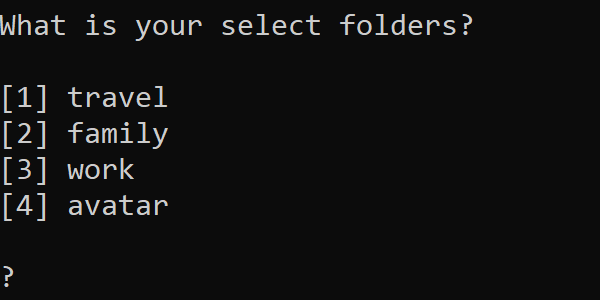
- Next, we ask user which option they will choose:
echo.
echo What is your select folders?
echo.

for /l %%x in (1,1,!count!) do (
    echo [%%x] !choice[%%x]!
)
echo.
- After enter a number to command line, your selected value will show and transfer to
xcopycommand on last line
set /p chose=?
echo.

echo You chose !choice[%chose%]!
set folder=!choice[%chose%]!

3. Conclusion.
This is a very simple select list to make selectable options when running batch file on Window. If you want to do it on UNIX, please refer this: HERE
Good luck.
[the_ad id=”8294″]